
Campaign notes usually begin sensibly. There’s a page for the opening adventure, a few NPC descriptions and perhaps a list of clues. Then the players spare someone you expected them to fight, ignore the obvious lead and turn a background shopkeeper into their favourite person in the world.
The difficulty isn’t creating more material. It’s keeping the new version of the campaign consistent. You need to know where that shopkeeper lives, which faction they support, how they feel about each player, what secrets the party has learned and which planned consequences have now become real.
FableRealms StoryEngine is a campaign-writing and world-record workspace for Dungeon Masters. The free Storyteller plan gives you the core StoryEngine features for one campaign: structured story pages, connected records for people and places, choices and consequences, clue-by-clue lore, random tables and a searchable Chronicle of what became canon.
This guide explains what those features mean in practical terms, including when to create an NPC and when a more detailed Character record makes better sense.
What is included with free StoryEngine access?
The free plan covers the complete core authoring workflow for a smaller campaign or one-shot.
The current free DM plan is called Storyteller. It includes one campaign, three characters, one active expedition and 1GB of storage at plan level, alongside access to StoryEngine, Worldbuilder, DM Table and DM GuildHall. Those limits may change, so the current FableRealms pricing page should remain the final reference.
Within StoryEngine, the free plan is described as including:
Acts, Chapters and Pages for campaign structure;
NPCs, Characters, Locations, Factions, Monsters and Lore;
Checks, Choices, Consequences and Story Outcomes;
Quests, Dungeons, Battles, Boss Fights and DM Notes;
clue-by-clue secret reveals;
Random Tables whose selected results can become campaign history; and
a searchable Chronicle of what has become canon.
StoryEngine is flexible campaign-management software, not a complete automated rules engine. It can record a possible check, a trap’s effect or a monster’s statistics, but the DM still calls for rolls, interprets the rules and decides what changes in the fiction.
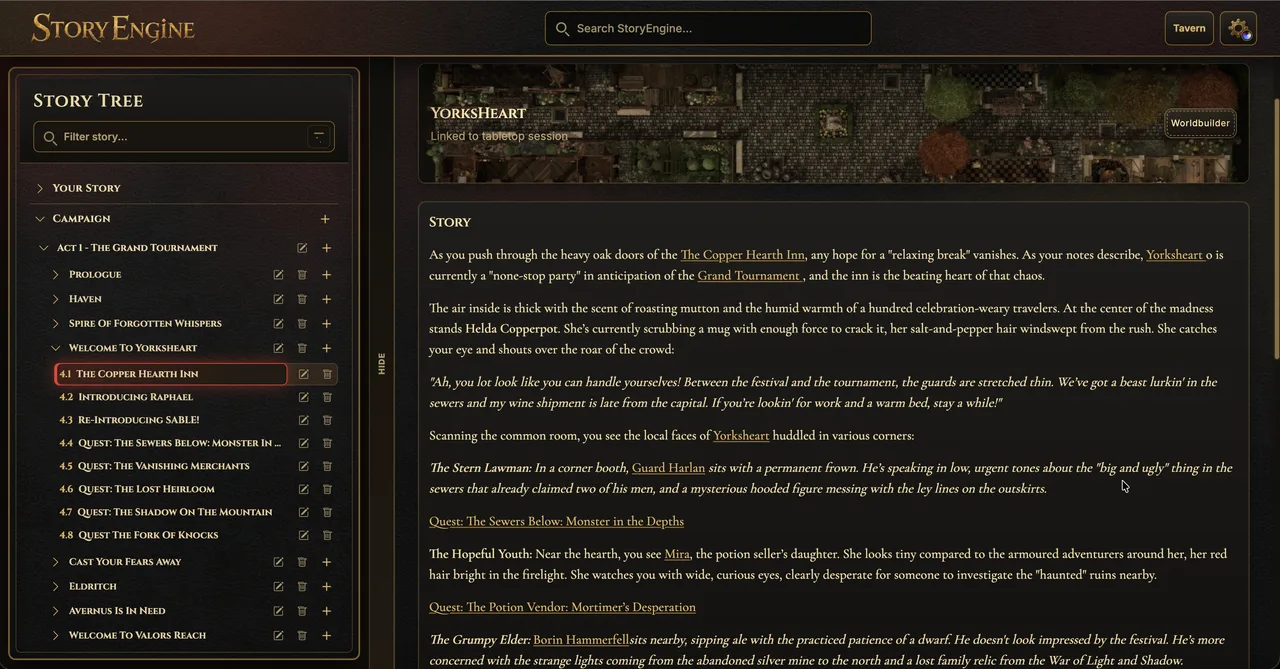
Acts, Chapters and Pages organise the playable story
Move from the broad campaign arc to the exact scene you need at the table.
An Act holds a broad part of the campaign. A Chapter groups related preparation within that act. A Page contains the working material for a scene, encounter, quest or event.
Acts can hold an overview and named planning notes. Chapters can hold their own overview and intended outcome. Pages switch between Edit mode for preparation and a cleaner Read mode for running the scene.
Each Page is assembled from blocks rather than one uninterrupted document:
Story holds narrative or read-aloud material.
DM Note keeps private reminders separate from player-facing prose.
Check records a possible check, its normal outcome, stronger success and an example.
Choice stores a decision, its options, likely outcome and story impact.
Consequence can respond to a campaign flag set by an earlier choice.
Random Table stores a dice expression, result ranges and content.
Quest, Dungeon, Battle and Boss blocks provide structured preparation for larger pieces of play.
Story Outcome records what actually happened in the scene.
That final distinction matters. The planned story may contain three possible endings; the Story Outcome records the one your group made real. Completed Pages can contribute their supported outcomes to the Chronicle, while reopening a Page returns it to an editable state.
StoryEngine also supports campaign-wide search across story pages and major record types. Results include titles, snippets and breadcrumbs, making it easier to find information without remembering exactly which Chapter contains it.
The wider workspace uses a structured, collapsible sidebar and offers Dark, Light, Wizard and Gothic themes, fullscreen controls, mobile navigation and an optional onboarding tour. Its Campaign Notepad can display, edit and remove captured campaign notes, although the reviewed active panel doesn’t include a new-note composer; notes can also arrive from supported Table workflows with scene, round and token context.
Major editors provide saving and error feedback, and participating screens warn about unsaved navigation. This isn’t one universal autosave system, so check the save state after substantial edits.
NPC or Character: which record should you create?
StoryEngine separates NPCs from Characters because not every person needs the same depth.
Use an NPC for a person who belongs to the world
An NPC record can hold a name, appearance, description, personality, alignment, race, sex and alive or dead status. You can link the NPC to a Location and Faction, store a separate attitude towards individual players and record interactions with the relevant actor and note.
NPCs also have revelation states: Not Seen, Seen, Learned and Hidden. These support what connected player-facing tools may present about that person. A portrait can be uploaded and cropped into token artwork.
This makes NPCs suitable for most townsfolk, witnesses, merchants, officials, rivals and recurring social figures. Rather than rewriting the same details on several Pages, mention or link the existing NPC record from the scenes where they matter.
Use a Character when the person needs more depth
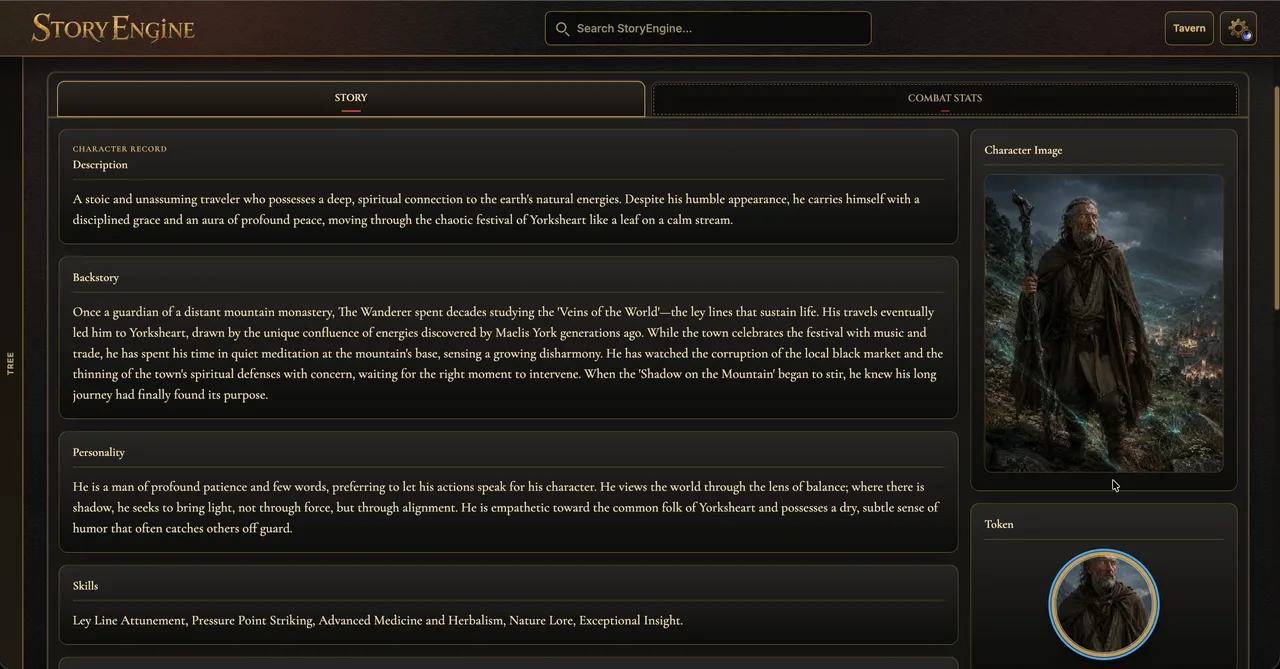
A Character record is better for an important member of the campaign cast who needs fuller story or combat information. Alongside description and personality, it can hold backstory, skills, looks, fears, quirks, hobbies, class, race and alignment.
Characters add size, level, proficiency, AC, initiative, speed, current, maximum and temporary hit points, the six ability scores, traits, actions, bonus actions and loot. They can be marked as companions and still link to Locations, Factions, player attitudes and interaction history.
Use a Character for a major ally, recurring villain, potential companion or named figure who may enter encounters using a detailed sheet. Use an NPC when social context and campaign links are enough.
StoryEngine has an NPC-to-Character conversion path, but the reviewed implementation creates a new Character and removes the NPC without remapping every possible old reference. Check existing mentions, markers and relationships after converting an established NPC.
Players and Monsters have separate jobs
A Player record is the DM’s campaign-side view of a party member, including relevant overview, inventory and battle information. A Monster is a reusable creature record containing combat statistics, abilities, senses, resistances, artwork and possible loot. Neither replaces an NPC or Character record simply because all four can appear in the same campaign.
Locations, Factions and Monsters keep the world connected
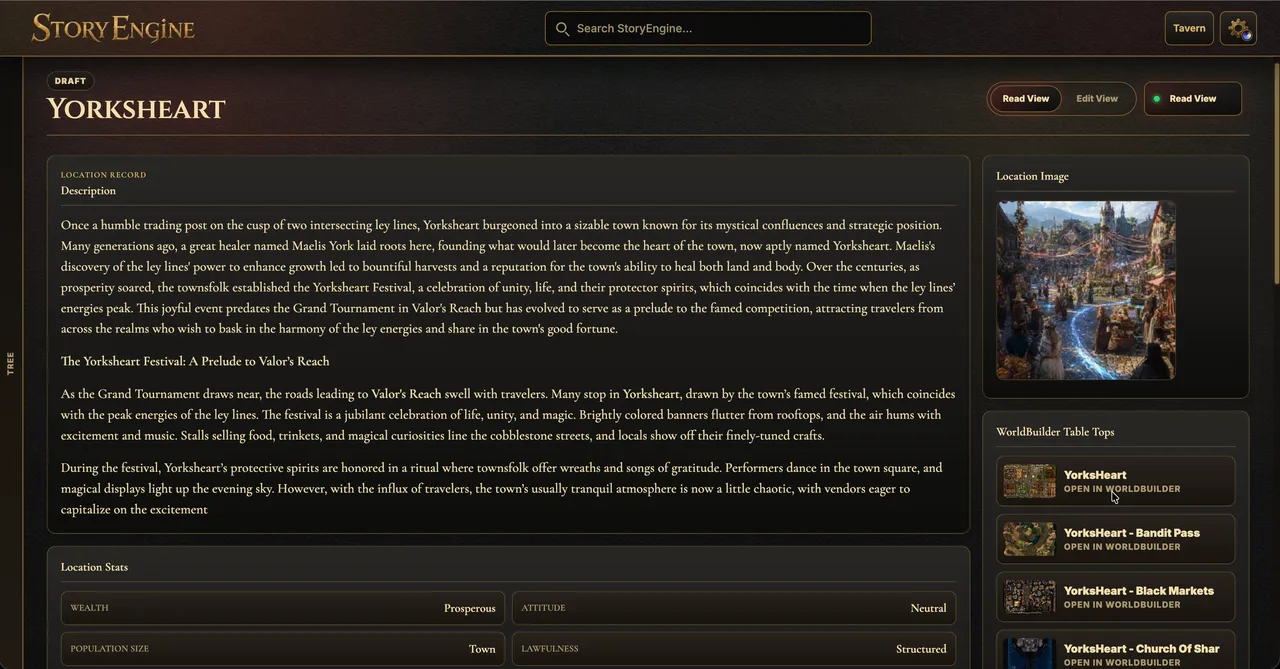
A Location can hold descriptions, images, key features, secrets and clues. Locations may sit beneath larger places, allowing a city to contain districts, buildings and points of interest. StoryEngine derives inhabitants from linked NPCs and Characters, so a Location can show who belongs there without maintaining a second handwritten list.
Buildings can be marked as shops. Shop stock supports names, descriptions, categories, quantities, prices, artwork and key-item flags. A supported selling workflow can charge a linked player and update inventory, but stock reduction and buyer history rely on the Location being saved; it shouldn’t be described as an atomic transaction.
A Faction stores its description, motto, image and founding or home Location. It can show linked members, influence over Locations and attitudes towards individual players.
A Monster can store AC, hit points, movement, ability scores, saves, skills, resistances, immunities, vulnerabilities, senses, languages, challenge rating, experience, traits, actions, reactions and possible loot. These are editable records for preparation and reuse, not automatic encounter-balancing guarantees.
The practical rule is simple: link records when the connection will matter again. You don’t need to fill every field simply because it exists.
A sensible first-session workflow
Create one Act and the Chapter you’re currently running.
Add Pages for the scenes, quests or encounters you reasonably expect to use.
Create NPC, Location and Lore records only for details likely to recur.
Link those records from the relevant Pages rather than copying their information.
Prepare important Checks, Choices, Consequences and Random Tables.
During or after play, record selected branches, revealed clues and the actual Story Outcome.
This keeps StoryEngine focused on the work that helps you run the campaign. The goal isn’t to complete every field; it’s to make important information easier to find and the campaign’s history easier to trust.
Frequently asked questions
Is FableRealms StoryEngine free for Dungeon Masters?
Yes. The Storyteller plan currently includes StoryEngine for one campaign, alongside plan limits of three characters, one active expedition and 1GB of storage. Check the current pricing page before relying on those limits, as packaging may change.
Is an NPC the same as a player character?
No. An NPC is a DM-managed person in the campaign world, while a Player record represents the DM’s view of a party member and can link to an external Tavern character. A StoryEngine Character is another distinct record intended for important campaign cast members who need deeper narrative or combat detail.
Does StoryEngine automatically run the game rules?
No. StoryEngine helps you prepare checks, traps, monsters, battles and outcomes, but it doesn’t replace the DM’s judgement or execute a complete rules system. You decide when a roll is needed and how its result changes the scene.
Can players see my private NPC and Lore notes?
Not by default simply because the record exists. NPC revelation states, Lore reveal text and player-visibility controls help prepare selected information for supported Codex workflows. Actual delivery still depends on the player link, visibility rules and connected service.
Can I use StoryEngine during a live session?
Yes. Pages have a cleaner Read mode, campaign-wide search helps locate records, and supported Table embedding can navigate linked story pages. Live tabletop controls themselves belong to Table, while StoryEngine remains the writing and campaign-record workspace.
Start with one Chapter, the Pages needed for your next session and a few reusable NPC, Location and Lore records. Once that structure is useful at the table, add deeper Characters, Factions, Quests and campaign history where the story needs them.
Create a free FableRealms account and begin with one connected session.